In This Article
A power station under £200 for laptop charging is a compact, rechargeable battery box, typically 99Wh to 300Wh, with a USB-C Power Delivery port (and often a mains socket) that can run or recharge a laptop away from a wall plug. It trades the big-appliance muscle of pricier units for portability and price. That’s the sweet spot this guide is built around.

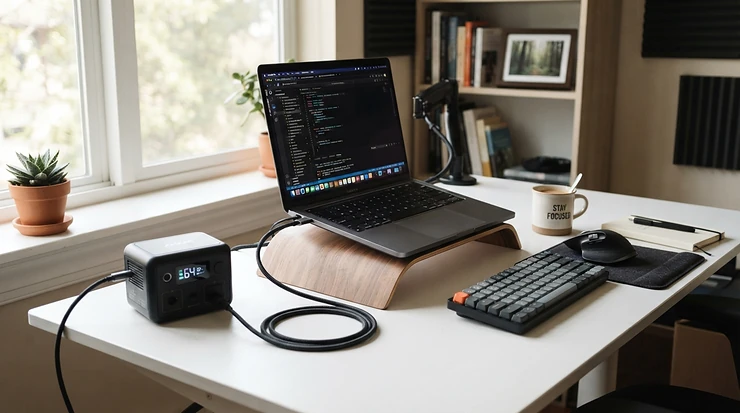
Here’s the scenario. Your train stops outside Reading for 40 minutes, a storm takes out the street’s power, or your “quick” campsite work session turns into an all-afternoon one. A phone power bank won’t save a 65W laptop. A £700 power station is overkill. A well-chosen power station under £200 for laptop charging sits neatly between the two.
Prices in this category have fallen sharply, and USB-C has become the standard way to feed a laptop. Reviewers have praised the accurate 100W USB-C output on units like the one in TechRadar’s EcoFlow River 3 review. Capacity alone won’t tell you which unit suits you. The USB-C wattage, the presence of a mains socket and the weight matter just as much.
I compared seven real products using manufacturer specifications and published reviews. I haven’t tested them hands-on, so every opinion below is analysis of that data rather than lived experience. I’ll also be straight about where a unit sits right on the £200 line.
Quick Comparison: Power Station Under £200 for Laptop Charging at a Glance
| Product | Capacity | Best laptop port | Mains socket | Price range | Best For |
|---|---|---|---|---|---|
| EcoFlow River 3 | 245Wh | 100W USB-C | Yes (300W) | around £140–£190 | All-round use |
| Anker SOLIX C300 DC | 288Wh | 2 × 140W USB-C | No (DC only) | around £170–£200 | Fastest USB-C laptop charging |
| Jackery Explorer 240 v2 | 256Wh | 100W USB-C | Yes (300W) | around £150–£200 | Quick recharging, app control |
| BLUETTI Elite 30 V2 | 288Wh | 140W USB-C | Yes (600W) | around £200–£220 | Desk backup (UPS) |
| Anker SOLIX C200 DC | 192Wh | 140W USB-C | No (DC only) | around £150–£180 | Compact laptop top-ups |
| Jackery Explorer 100 Plus | 99Wh | 100W USB-C | No | around £70–£140 | Flights and travel |
| Anker 521 PowerHouse | 256Wh | 60W USB-C | Yes (200W) | around £190 | Laptops under 60W |
Looking at the table, the EcoFlow River 3 and Jackery Explorer 240 v2 are the safest all-rounders because they pair a 100W USB-C port with a mains socket. If you only ever charge via USB-C, the Anker SOLIX C300 DC gives you the most capacity and the fastest ports for the money. The Jackery Explorer 100 Plus is the only unit here small enough to fly, and the BLUETTI Elite 30 V2 only dips under £200 when a promotion is running.
💬 Just one click — help others make better buying decisions too!😊
Top 7 Power Stations Under £200 for Laptop Charging: Expert Analysis
I ranked these by how well they serve a laptop owner specifically: USB-C wattage, mains-socket flexibility, runtime and value. Specs come from manufacturer listings and independent reviews, and prices are ranges that may vary.
1. EcoFlow River 3 — best all-round 100W USB-C pick
The EcoFlow River 3 behaves like a mains socket and a laptop charger in one 3.5kg box. Its 245Wh LiFePO4 battery is rated for around 3,000 cycles to 80% capacity, which in practice means years of use before it noticeably fades. The single USB-C port delivers up to 100W, enough for most ultrabooks and 14-inch work laptops without their brick. The 300W AC outlet (600W with X-Boost) covers the stubborn laptop that insists on its original charger.
On the spec sheet, the compromise is port count: one USB-C, two 12W USB-A and a car socket. That suits one laptop plus a phone, but not two laptops. Reviewers praised the accuracy of the 100W output and the sub-30dB running noise. Several wished for a second USB-C port. I couldn’t verify a large pool of verified-buyer reviews, so treat this as editorial sentiment, not a star rating.
Pros:
- ✅ 100W USB-C plus a 300W mains socket
- ✅ LiFePO4 cells rated for around 3,000 cycles
- ✅ Quiet, with UPS-style switchover for desk backup
Cons:
- ❌ Only one USB-C port
- ❌ Heavier than DC-only alternatives of similar capacity
Priced around £140–£190, it’s the cheapest way into both 100W USB-C and a mains socket, which makes it excellent value.

2. Anker SOLIX C300 DC — best for fast USB-C laptop charging
The Anker SOLIX C300 DC is essentially a very large power bank wearing a power-station badge. It packs 288Wh into a LiFePO4 pack with two 140W two-way USB-C ports, a 100W USB-C, a 15W USB-C, two 12W USB-A and a 120W car socket. The dual 140W ports can also recharge the unit itself, reaching roughly 80% in an hour if you own two suitable chargers.
Here’s the catch: there’s no AC outlet at all. If your laptop has a barrel-plug charger, this isn’t your unit. A 140W port also won’t charge your laptop any faster than the laptop is willing to draw, so a 65W machine still pulls 65W. A reviewer noted that fast recharging needs those two high-wattage inputs, which most people won’t have to hand. It also isn’t compatible with Anker’s PS30 solar panel.
Pros:
- ✅ Two 140W two-way USB-C ports
- ✅ 288Wh is generous at this price
- ✅ Seven ports charge a whole desk’s worth of gear
Cons:
- ❌ No mains socket at all
- ❌ Fast recharging needs high-wattage USB-C chargers
Expect around £170–£200, with Anker’s UK list price sitting at the top of that band. It’s strong value if you’re a USB-C-only household.
3. Jackery Explorer 240 v2 — best for one-hour flash recharging
The standout trick of the Jackery Explorer 240 v2 is speed of refill. Enable fast-charging in the app and Jackery says it reaches full in about an hour from the mains, or around two hours in the gentler standard mode. Inside is a 256Wh LiFePO4 battery weighing 3.5kg, with a 300W AC outlet, a 100W USB-C input/output port, a 15W USB-C, a USB-A and a 12V car port.
That two-way 100W port is the quiet hero. You can top the unit up from a laptop charger, then reverse the flow to power the laptop. Reading the specs, it’s a very similar proposition to the EcoFlow River 3, with a faster recharge and a second USB-C port, though the second is only 15W. Jackery also lists five years of customer support. Solar users should note that a DC8020-to-USB-C adapter is needed for Jackery’s panels. I couldn’t verify a robust sample of verified-buyer reviews, so I’m leaning on the spec sheet here.
Pros:
- ✅ One-hour flash recharging via the app
- ✅ 100W two-way USB-C plus 300W AC
- ✅ Wi-Fi and Bluetooth monitoring
Cons:
- ❌ Second USB-C port is only 15W
- ❌ Solar panels need an extra adapter
Prices land around £150–£200 depending on promotions. It’s good value for anyone who forgets to charge things the night before.
4. BLUETTI Elite 30 V2 — best 140W port with built-in UPS
The BLUETTI Elite 30 V2 is the most “desk-ready” unit here. It offers 288Wh, a 600W pure-sine AC outlet (1,500W surge), a 140W USB-C PD 3.1 port, a 100W USB-C, two 15W USB-A and a car socket. A UPS switchover of 10ms or less means it can sit under a desk and take over when the mains drops. That matters if a power cut would cost you unsaved work.
One reviewer ran a laptop through a 10-hour working day on the 140W port and still had roughly 40% left. That’s consistent with direct USB-C charging wasting less energy than going through an AC inverter. The unit weighs 4.3kg, which is noticeably heavier than the 3.5kg rivals. One UK buying guide also flags mixed experiences with the brand’s UK customer service, so check warranty terms before you buy.
Pros:
- ✅ 140W USB-C plus 600W AC output
- ✅ UPS switchover for desk backup
- ✅ Five-year warranty listed by the manufacturer
Cons:
- ❌ Heaviest of the AC-equipped options
- ❌ Often sits just above the £200 line
At around £200–£220 it is only under £200 during promotions. Check current pricing, and consider the EcoFlow River 3 if the budget is rigid.
5. Anker SOLIX C200 DC — best compact 140W laptop battery
The Anker SOLIX C200 DC is the sensible shrink-down of the Anker SOLIX C300 DC. It carries 192Wh (60,000mAh) and 200W output, with a 140W two-way USB-C, a 100W USB-C, a 15W USB-C and two 12W USB-A ports. Anker quotes roughly 80% recharge in about 1.3 hours through the 140W port.
In practice, 192Wh runs a typical 45W laptop for roughly three and a half hours, my estimate assuming around 85% usable efficiency. It’s ideal as a “get me through the afternoon” companion. It’s also DC-only, so no AC socket. Anker’s own FAQ says any USB-C PD charger of 18W or higher will charge it, but you need a 140W source for full speed. Note that at 192Wh it exceeds the 160Wh passenger limit, so it can’t fly (see the airline section below).
Pros:
- ✅ 140W USB-C at a lower price than the C300
- ✅ Light enough to carry daily
- ✅ Three USB-C ports for laptop, phone and tablet
Cons:
- ❌ No mains socket
- ❌ Too big for passenger baggage on flights
Expect around £150–£180. It’s solid value if you’re comfortable without AC.

6. Jackery Explorer 100 Plus — lightest and the only one that can fly
The Jackery Explorer 100 Plus is the odd one out, and deliberately so. At 99Wh it sits just under the 100Wh airline threshold, and at 965g it’s small enough for a backpack. It has two USB-C ports supporting 100W Power Delivery and one USB-A, with a LiFePO4 battery rated for 2,000 cycles to 80%.
One press report confirmed there’s no three-pin mains socket, so this is a USB-C and USB-A device only. Reviewers like the 100W dual PD but note the screen is dim in bright sun. A reviewer measured roughly four hours to recharge from a modest USB-C source, versus the 1.8 hours Jackery claims with a 100W supply. With 99Wh, I’d expect around 1.9 hours of 45W laptop use (my estimate), so think “one extra charge” rather than “all-day power”.
Pros:
- ✅ Only unit here that is airline-friendly
- ✅ Dual 100W PD ports in under 1kg
- ✅ LiFePO4 cells rated for 2,000 cycles
Cons:
- ❌ Provides barely one extra laptop charge
- ❌ Slow recharge without a 100W supply
Around £70–£140 is the range, with the low end appearing during promotions. It’s great value for travellers.
7. Anker 521 PowerHouse — best for laptops under 60W with a mains socket
The Anker 521 PowerHouse is the older head-turner: 256Wh of LiFePO4 cells rated for 3,000 cycles to 80%, with a 200W AC output, a 60W USB-C port that works both ways, two USB-A ports and a car socket. At 4.34kg it’s a bit weighty.
Here’s the spec that matters: 60W caps USB-C at about the level of a typical ultraportable’s charger. A 65W machine may charge slowly or not at all under load, and that’s before you consider heavier laptops. The 200W AC socket rescues you if you carry the original brick. Anker also warns the unit isn’t suitable for appliances above 200W. Availability looks patchy, since some retailers list it as discontinued or out of stock, so check stock before you commit. With limited recent review data to verify, I’d treat it as a bargain-hunter’s option rather than a first choice.
Pros:
- ✅ 256Wh LiFePO4 with 3,000-cycle rating
- ✅ 200W mains socket for original laptop chargers
- ✅ Two-way 60W USB-C
Cons:
- ❌ USB-C tops out at 60W
- ❌ Stock can be patchy on this older model
Around £190 is the typical price band. The value is only decent if you find it in stock and your laptop needs 60W or less.
Runtime and Value Snapshot
| Product | Est. laptop hours at 45W | Price range | Approx. cost per Wh | Best For |
|---|---|---|---|---|
| EcoFlow River 3 | ≈4.6h | around £140–£190 | ≈57–78p | Mains plus USB-C |
| Anker SOLIX C300 DC | ≈5.4h | around £170–£200 | ≈59–69p | USB-C-only homes |
| Jackery Explorer 240 v2 | ≈4.8h | around £150–£200 | ≈59–78p | Fast refills |
| BLUETTI Elite 30 V2 | ≈5.4h | around £200–£220 | ≈69–76p | Desk backup |
| Anker SOLIX C200 DC | ≈3.6h | around £150–£180 | ≈78–94p | Light top-ups |
| Jackery Explorer 100 Plus | ≈1.9h | around £70–£140 | ≈71–141p | Flights |
| Anker 521 PowerHouse | ≈4.8h | around £190 | ≈74p | Sub-60W laptops |
Runtime assumes roughly 85% usable efficiency and a steady 45W draw. These are my estimates, not lab results, and the cost per Wh is derived from the price ranges above.
The value picture is tighter than the headlines suggest. The Anker SOLIX C300 DC and EcoFlow River 3 give you the most watt-hours per pound, while the Anker SOLIX C200 DC costs more per Wh but weighs less. The Jackery Explorer 100 Plus looks poor on cost per Wh, and that’s the price of being legal on a plane.
✨ Ready to Cut the Cord on Your Charger?
🔍 Take your laptop charging to the next level with these carefully selected products. Click any highlighted product name to check current pricing and availability. 🔋 The right unit will keep your work going through delays, outages and off-grid afternoons.
How to Choose a Power Station Under £200 for Laptop Charging
The short answer: match the USB-C wattage and socket type to your laptop first, then pick capacity. Here’s the order I’d work in.
- Read your laptop charger’s wattage. The label on the brick tells you the maximum your laptop will draw, and everything else follows from it.
- Pick USB-C wattage before capacity. A 288Wh unit with a 60W port is worse for a 90W laptop than a 245Wh unit with a 100W port.
- Decide whether you need a mains socket. If your laptop uses a barrel plug, you need an AC outlet. DC-only units like the Anker SOLIX C300 DC and Anker SOLIX C200 DC won’t work.
- Size the battery to your day. Divide usable Wh (roughly 85% of the rated figure) by your laptop’s typical draw to get hours.
- Check chemistry and warranty. LiFePO4 cells are typically rated for thousands of cycles, and warranties here range from two years to five.
- Weigh it. A 3.5kg unit and a 965g unit feel very different on a commute.

Power Station with USB-C PD for Laptops: What to Look For
A power station with USB-C PD for laptops needs more than a port labelled “PD”. The port should state its wattage, ideally 65W or higher, and it should work reliably under a sustained load.
Check three things. First, the headline wattage: 100W covers most laptops, while 140W only helps if your laptop requests those higher voltages. Second, whether the port is two-way, as on the Jackery Explorer 240 v2 and Anker SOLIX C300 DC, because that makes recharging easier. Third, how many ports share that power, since several units split their output when multiple devices are plugged in.
Be wary of generic 99Wh units with vague listings. During my research I found near-identical-looking products whose USB-C ports ranged from 18W to 65W depending on the listing. That’s the difference between a laptop that charges and one that merely sips.
A final tip: use a decent cable. A power station with USB-C PD for laptops can only deliver what the cable allows, and a basic cable will quietly cap you at 60W.
USB Power Delivery Wattage Explained
USB Power Delivery wattage is negotiated, not fixed. When you plug in, the laptop and the power station agree a voltage and current, and the laptop asks for what it needs. The USB-IF’s charger specification page describes how the standard raised the ceiling to 240W through new 28V, 36V and 48V levels, which correspond to 140W, 180W and 240W.
In plain terms:
- 5V to 20V profiles: these cover up to 100W (20V at 5A). A standard cable carries 3A, which limits you to 60W.
- Extended Power Range (EPR): 28V at 5A gives 140W, which is why some units advertise 140W ports.
- Negotiation: the laptop picks. A 65W laptop on a 140W port still draws 65W.
For this budget, USB Power Delivery wattage up to 100W is what matters. The 140W ports on the BLUETTI Elite 30 V2 and Anker SOLIX C300 DC are a bonus only for laptops, such as some 16-inch models, that request those higher levels. Otherwise they’re simply headroom.
Laptop Charger Wattage: How to Match Your Laptop to the Right Power Station
Laptop charger wattage is simply volts multiplied by amps. A brick that says 20V and 3.25A delivers 65W, so you want a port that can supply at least that.
| Laptop type | Typical charger | What you need | Fits from this list |
|---|---|---|---|
| Ultraportable | 45–65W | 65W USB-C | Anker 521 PowerHouse, Jackery Explorer 100 Plus, all others |
| 14–16″ work laptop | 65–100W | 100W USB-C | EcoFlow River 3, Jackery Explorer 240 v2 |
| High-end 16″ model | 100–140W | 140W USB-C | BLUETTI Elite 30 V2, Anker SOLIX C300 DC |
| Gaming laptop | 150W+ | AC output | Mostly out of reach at this price |
These are typical ranges, so check the label on your own brick.
If a unit supplies less than your laptop wants, it will charge slowly or drain while you work. Gaming laptops with 150W-plus barrel chargers are a poor match for this budget, because the 300W AC outlets on the cheaper units barely leave headroom once efficiency losses are counted. Treat any power station under £200 for laptop charging as a tool for work laptops and ultraportables, not for desktop-replacement gaming rigs.
Portable Power Station vs Power Bank for Laptop
The portable power station vs power bank for laptop question comes down to capacity, weight and flights. A 27,000mAh power bank holds roughly 99.9Wh (27,000 × 3.7V ÷ 1,000), which matches the Jackery Explorer 100 Plus. A power station gives you two to three times that.
| Factor | Power bank | Portable power station |
|---|---|---|
| Typical capacity | 37–100Wh | 99–300Wh |
| Weight | 0.2–1kg | 1–4.3kg |
| Mains socket | Rare | Common (not on DC-only units) |
| Flights | Allowed up to 100Wh | Only the 99Wh unit |
| Price | £25–£150 | £70–£220 |
A power bank wins on weight and flights. A power station wins on capacity, battery chemistry and flexibility. If you commute, a power bank with a 100W USB-C port is probably enough. If you work remotely, camp, or want power-cut insurance, the portable power station vs power bank for laptop debate tips towards the station. The Jackery Explorer 100 Plus sits awkwardly in the middle: it has a power bank’s size and a power station’s feature set.
Practical Usage Guide: Setting Up Your Power Station for Laptop Charging
The first 30 days set the pattern for the battery’s life. Here’s what I’d do.
Day one: charge to full and update the firmware through the app, if the unit has one. The Jackery Explorer 240 v2, EcoFlow River 3 and BLUETTI Elite 30 V2 all have app control. For the Anker SOLIX C300 DC, activate it for the first time with an 18W-or-higher USB-C wall charger, using the USB-C2 or USB-C3 port.
Week one: use the USB-C port rather than the AC outlet whenever your laptop allows. Going direct skips the inverter, which generally wastes less energy, and the BLUETTI Elite 30 V2 test above hints at the benefit.
Ongoing: keep the unit between 0°C and 40°C while charging, and avoid leaving it in a hot car. For storage, BLUETTI recommends topping up every three to six months, which is a sensible habit for any LiFePO4 unit.
Common mistakes in the first 30 days: using a basic 3A cable on a 100W port, plugging the laptop into a 15W port by accident, and forgetting that the Anker SOLIX C200 DC needs a 140W source for full recharge speed.

Real-World Scenarios: Which Power Station Under £200 for Laptop Charging Fits You?
The commuter (budget around £100, daily use). You work on trains and want one extra laptop charge. Weight and flights matter more than capacity, so the Jackery Explorer 100 Plus fits. It’s light, flies, and its 100W USB-C handles most work laptops.
The remote worker (budget around £200, occasional power cuts). You need five hours of work through an outage and a desk-friendly unit. The BLUETTI Elite 30 V2 offers 288Wh, UPS switchover and a 140W port. If the budget is firm, the EcoFlow River 3 gets you most of the way for less.
The weekend camper (budget around £180, a few trips a year). You need to run a 65W laptop plus phone charging for a day. The Jackery Explorer 240 v2 gives you a mains socket and a one-hour recharge before you leave. If everything you own is USB-C, the Anker SOLIX C300 DC gives you more capacity for similar money.
In each case, the right power station under £200 for laptop charging depends on how often you’ll carry it, not just how much power it holds.
Problem → Solution Guide: When Your Laptop Won’t Charge Properly
“Charging slowly” or not charging at all. The cable is the usual culprit. A standard USB-C cable carries 3A, and Texas Instruments’ USB PD overview notes that going beyond 60W requires a 5A cable. Swap to a cable rated for 100W.
The unit beeps or cuts out on AC. Your laptop’s brick may draw more than the inverter allows. Use the USB-C port instead, or check the brick’s rating against the unit’s AC limit.
Runtime is shorter than expected. Remember the usable-capacity estimate (about 85%), screen brightness and any charging of other devices. A 288Wh unit isn’t 288Wh of laptop.
The laptop has a barrel plug and your unit is DC-only. Models like the Anker SOLIX C200 DC simply can’t power it. You need an AC-equipped unit such as the EcoFlow River 3 or Jackery Explorer 240 v2.
The unit recharges slowly. Use the highest-wattage charger the port supports. The Anker SOLIX C200 DC, for instance, needs a 140W source for full-speed recharging.
Long-Term Cost & Maintenance
Cheap batteries cost more over time. LiFePO4 cells in the EcoFlow River 3, BLUETTI Elite 30 V2 and Anker 521 PowerHouse are rated for around 3,000 cycles to 80% capacity, while the Jackery Explorer 100 Plus is rated for 2,000.
Do the maths. A unit costing around £170 and delivering a full 245Wh cycle 3,000 times produces about 735kWh over its rated life, so the hardware works out at roughly 23p per kWh before electricity. That’s my own estimate, and it assumes you really do use every cycle. It still shows why a cheap lead-acid-style alternative isn’t automatically cheaper.
Warranty length varies. The BLUETTI Elite 30 V2 lists five years, the Anker SOLIX C300 DC lists three, and the Jackery Explorer 100 Plus lists two. Maintenance is simple: store at partial charge, top up every few months, and keep the vents clear.
Common Mistakes When Buying a Power Station Under £200 for Laptop Charging
- Buying by Wh alone. A big battery with a 60W port can still fail a 90W laptop.
- Ignoring DC-only. The Anker SOLIX C300 DC is brilliant, but only if you never need a mains plug.
- Assuming 140W means faster. Your laptop sets the speed, not the port.
- Trusting vague listings. Check the USB-C wattage in the specs, not the headline.
- Forgetting flights. Only the 99Wh unit here is anywhere near airline-legal.
- Chasing a promotion price. The BLUETTI Elite 30 V2 can fall just under £200, but plan for the usual price.
Power Bank Airline Limits: What the CAA Says
Power bank airline limits matter because only one product here, the Jackery Explorer 100 Plus, comes close to meeting them. The UK Civil Aviation Authority’s Pack Right guidance is clear that power banks and spare lithium batteries belong in your cabin baggage, never in checked luggage. It gives the formula (V × mAh ÷ 1,000 = Wh), and it states that batteries over 160Wh are prohibited in passenger baggage.
Manufacturer guides based on CAA rules add that power banks up to 100Wh need no operator approval, while those between 100Wh and 160Wh need airline approval, with a limit of two per person. Individual airlines can be stricter. Several apply a flat 100Wh ceiling, so always check your carrier.
What this means for you:
- The Jackery Explorer 100 Plus (99Wh) sits under the 100Wh line, though you should confirm your airline’s rules.
- The Anker SOLIX C200 DC (192Wh) and everything larger exceed 160Wh and can’t go in passenger baggage.
- Don’t charge a power bank in flight, and check whether your airline allows using it to charge other devices.
The CAA also warns that lithium batteries are now a leading fire risk in aircraft, so these rules aren’t a formality.

FAQ
❓ Can a power station under £200 for laptop charging run a gaming laptop?
❓ Will a 140W USB-C port charge my 65W laptop faster?
❓ How long will a 288Wh power station run my laptop?
❓ Can I use the power station while it's charging?
❓ Is a power station worth buying over a cheaper power bank?
Conclusion
If you want one answer, the EcoFlow River 3 is the safest all-rounder: 100W USB-C, a 300W mains socket and LiFePO4 cells at a price that stays comfortably under £200. If your world is entirely USB-C, the Anker SOLIX C300 DC offers more capacity and faster ports. The Jackery Explorer 240 v2 is the pick for people who forget to charge things, thanks to its one-hour flash recharge. The BLUETTI Elite 30 V2 earns its place for desk backup, even if it only dips under £200 on promotion.
For travellers, the Jackery Explorer 100 Plus is the only realistic option that can fly. Budget buyers should weigh the Anker SOLIX C200 DC for compact top-ups, and the Anker 521 PowerHouse only if they find it in stock and own a laptop that needs 60W or less.
Whatever you choose, start with your charger’s wattage, then check the USB-C port, then the socket type, and only then look at capacity. Do that, and a power station under £200 for laptop charging will earn its place in your bag.
Recommended for You
- Power Station For CPAP Camping: 7 Reliable UK Picks (2026)
- Portable Power Station For CPAP Machine: 7 Safe Picks (2026)
- CPAP Power Station Vs CPAP Battery Pack: 7 Top Picks (2026)
Disclaimer: This article contains affiliate links. As an Amazon Associate, I earn from qualifying purchases. If you purchase products through these links, we may earn a small commission at no additional cost to you.
✨ Found this helpful? Share it with your friends! 💬🤗
